Agents — the thing you build
Shipped
View as MarkdownAn agent is the unit you build and then talk to. It binds one of your providers and a model it serves to a system prompt, a handful of sampling controls, and the tools it is allowed to call. You make as many as you like, and each can sit on a different backend.
Why it matters
The provider decides where the compute happens; the agent decides how the model behaves — its standing instructions, how adventurous its sampling is, whether it reasons before answering, and what it can reach through tools. Two agents on the same provider and model can behave nothing alike, because everything that shapes a turn lives on the agent.
What you configure
- Name — required, and unique within its workspace.
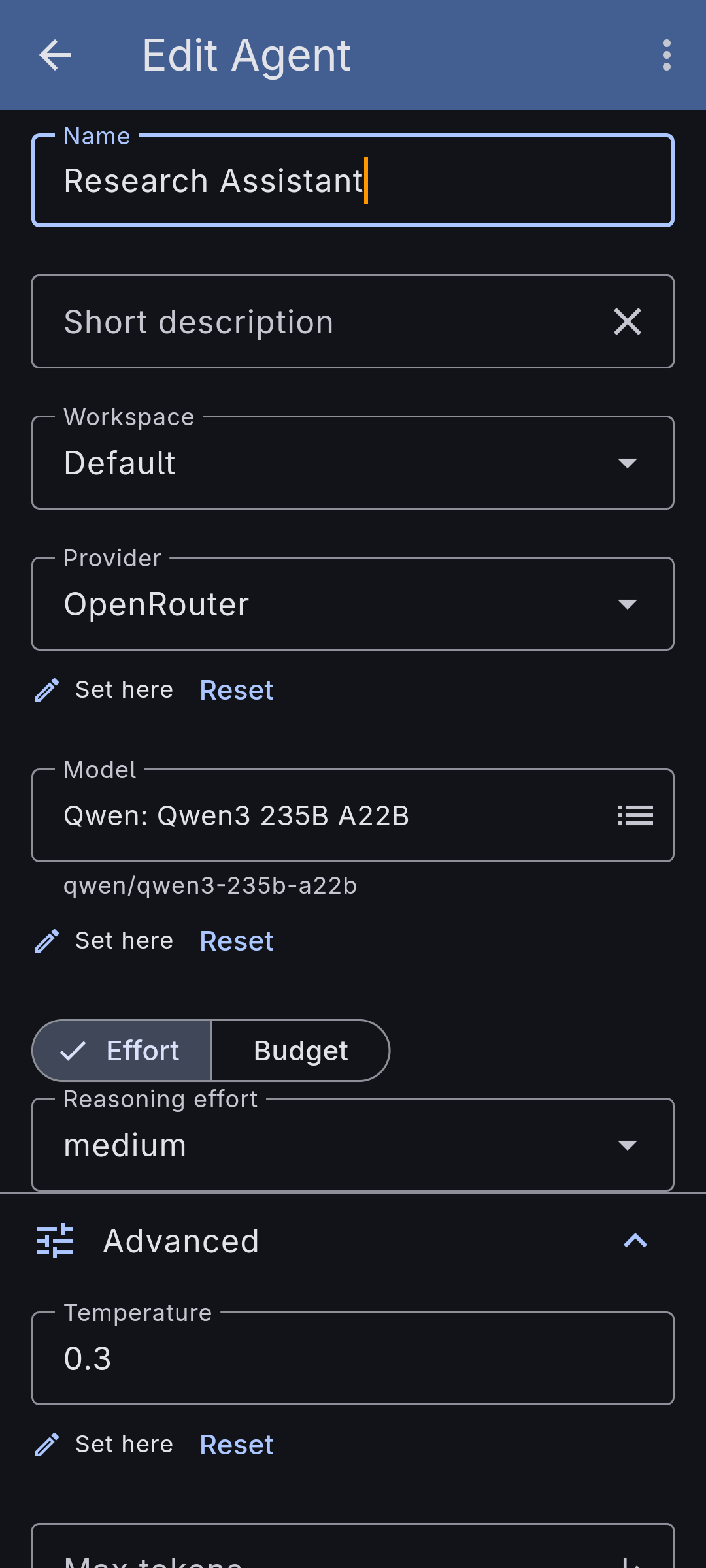
- Short description — an optional one-line summary of what the agent is for. It never enters the agent's own prompt; it's there so other agents that manage or call this one can tell it apart at a glance.
- Provider & model — pick one of your providers, then a model it serves from that provider's list. You choose the model from the catalog; you don't type a model id.
- System prompt — the standing instructions for the agent. Multiline, optional.
- Welcoming message — an optional opening message shown when a new conversation with the agent starts.
- Model tuning — next to the model, an Advanced expander holds Temperature, Max tokens, Frequency penalty, Presence penalty, Repetition penalty, and — for models that reason — a control to turn thinking on or off, choose an effort level, or set a token budget. Each control appears only when the chosen model advertises support for it, so the form won't show a knob the model would ignore, and the whole expander is hidden for models with nothing to tune.
- Turn, compaction & titling — under Additional settings: how many tool rounds a turn may take and how much history the model sees (the conversation loop), when and how a long conversation is compacted, and whether this agent titles and summarises its own conversations. Each of these starts inherited from your app-wide defaults and can be overridden just for this agent — see Inheriting from your defaults below.
- Tools — attach the tools this agent may call. Some (a memory namespace, a fetch request) carry their own small setup form. Shown only when the model supports tool calls.
- Workspace — an optional grouping; agents you don't file land in a Default workspace.
How it works
Open Agents, create one, and fill in as much as you need — at minimum a name, a provider, and a model. The prompt and the sampling controls are optional and fall back to sensible defaults. Because the sampling and reasoning controls are gated on the selected model's declared capabilities, the form only surfaces the knobs that model actually honours. Attach tools last; from then on the model decides when to call them during a conversation.
Inheriting from your defaults
Most of what shapes a turn has an app-wide value you set once on the Global settings page — Titles & summaries, Conversation loop and Context compaction, reached from Settings → Workspaces — and every agent inherits it until it decides to differ. Where an agent can override one, the form shows the value in force — the inherited number sits in the box, in italics behind a small ⤷ marker, with Inherited from the global settings beneath it. Type over it to set the agent's own value, and the line becomes Set here · would inherit 200 from the global settings with a Reset beside it that hands the field back — so you can see what letting go of an override restores before you do it. A workspace can carry its own overrides too, sitting between the global settings and the agent, so a whole workspace of agents can share a tuning without repeating it on each one.
The order, most general to most specific, is: the global settings, then the workspace, then the agent. Each layer only fills in what the layer above left unset. A conversation then keeps the agent's settings as they stood when it started, so tuning an agent later doesn't rewrite the conversations you already had. One thing never cascades: the provider and model. There is no fallback model — every agent binds its own, on purpose, so a turn always runs on a backend you chose rather than one inherited by accident.
Good to know
If you later swap or remove the provider, an agent keeps the model id it was built with rather than silently dropping it — it just flags that the id is no longer in the provider's list. Re-pick a model from the new provider to clear the warning. The conversation page and the editor also warn when the chosen model can't read a conversation's images or call its selected tools, so a capability mismatch is visible rather than a silent drop.
To start a new agent from an existing one, use Copy on the agent's page: it opens the create form pre-filled with a duplicate (its name suffixed "(copy)"), so you can adjust the name — which isn't checked for uniqueness until you save — before anything is written.