Run a model fully offline
View as MarkdownYou'll set up the embedded provider so a model runs entirely on your device from local files — no API key, no base URL, no network call.
What you need
- A GGUF model file (or several) already downloaded to the device. BYLM never ships a model; you bring the file.
- Enough device memory and storage for the model you pick.
- On Android, the files in a folder you can grant the app access to.
Steps
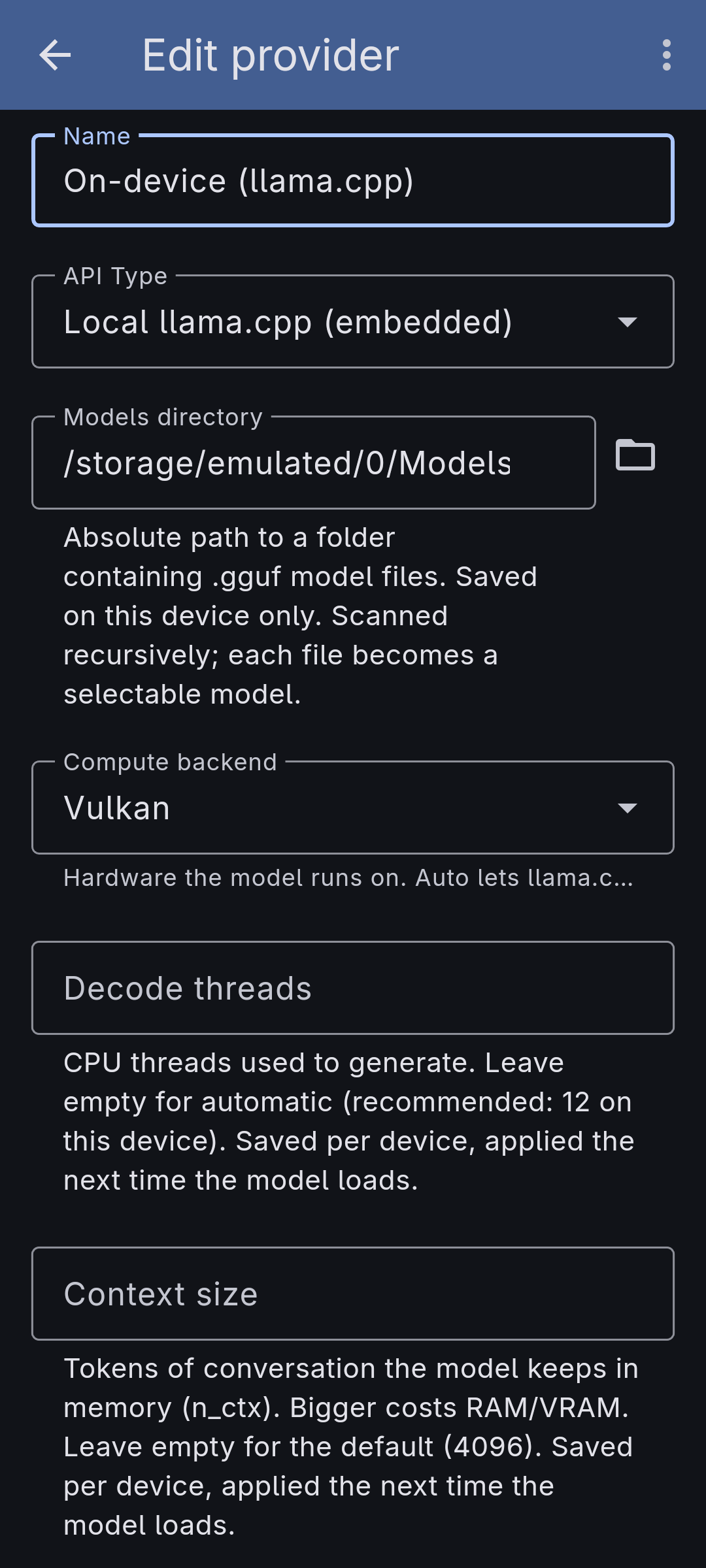
- Open Providers and add a provider of kind Local llama.cpp (embedded). It has no base URL and no API key.
-
Set the Models directory to the folder holding your
.gguffiles. On desktop, browse to the folder. On Android, grant a folder through the system file picker. The folder is scanned and each model file becomes selectable. -
Optionally choose the Compute backend — Auto lets the engine decide, or set CPU or Vulkan explicitly (ROCm as well, on Linux). It's saved per device and applied the next time a model loads.
-
Optionally cap Decode threads for CPU generation; leave it empty for an automatic count.
-
Create an agent, choose this provider, and pick one of the scanned models. Start a conversation — generation runs in-process, on your hardware, with nothing leaving the device.
Make it yours
- Keep an embedded agent beside a hosted one. Because you choose the provider per agent, the same app can hold a private local agent and a frontier hosted agent side by side.
- Swap backends to trade speed for compatibility — Vulkan (or ROCm on Linux) to use the GPU, CPU as the safe fallback.