Conversations — how a turn runs
Shipped
View as MarkdownA conversation is a back-and-forth with one of your agents. You send a message; the agent streams its reply token by token, and along the way it may call tools and keep going with what they return — all before it hands you a finished answer.
Why it matters
This is where constructor, not chatbot shows. A turn isn't a single request-and-response: the model can reach for the current time, ask you a question, fetch a URL, or recall a saved note in the middle of an answer, fold the result back in, and continue. And because turns are durable, they don't depend on you staying on the screen.
What a turn does
- Streams as it goes — you watch tokens appear rather than waiting on a spinner for a wall of text.
- Calls tools mid-turn — when the model asks for one or more tools, they run (several in parallel when it asks for several), their results are fed back, and the model continues in the same turn. This repeats until an answer needs no more tools.
- Keeps running in the background — turns run off the UI, so leaving the conversation, opening another, or backgrounding the app doesn't stop them, and more than one conversation can generate at once. This is a feature in its own right; see Background turns.
- Survives a restart — a turn cut short by a crash or a kill is re-queued when the app starts again.
Cancelling
Stop a running turn with the stop control. Cancellation is durable: the partial answer produced so far is kept, and the stop sticks even across a restart. The flip side is deliberate — because turns are decoupled from the screen, navigating away or backgrounding does not cancel a turn. Only an explicit stop, or the turn finishing, ends it.
Attachments
You can attach an image when the model supports vision, and a text file when the model advertises file input — the attach button only appears when the model accepts one or the other. See Attachments for the full list of supported formats, camera capture, and how the bytes reach the model.
The composer
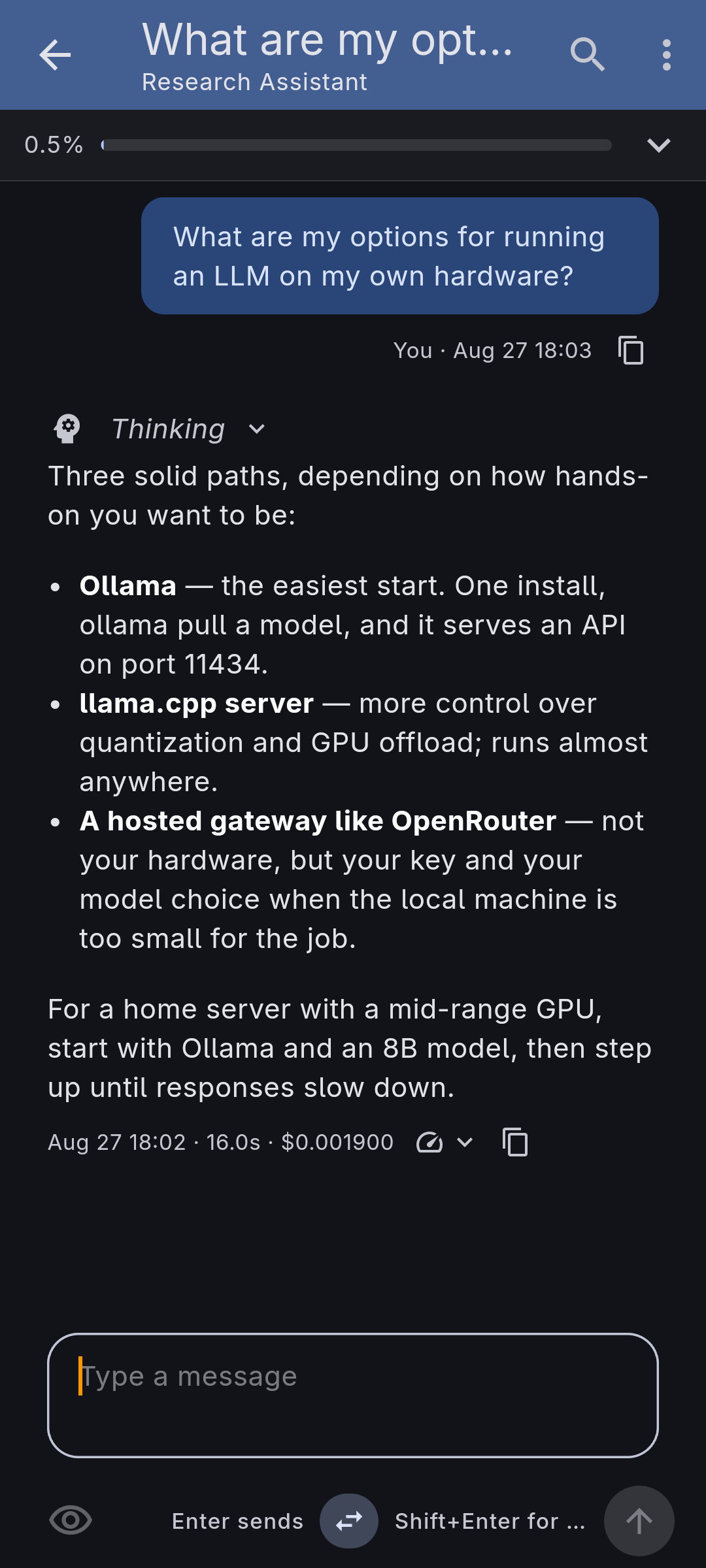
The message box is a bordered field with an action bar beneath it: attach on the left, send on the right. Enter sends on desktop and inserts a newline on mobile (Shift+Enter does the opposite), and a swap button flips that if you prefer. A preview toggle renders your draft as Markdown so you can check tables and code blocks before sending, and the field is spell-checked — see Spell checking.
Drafts
A message you type but don't send is kept. Leave the conversation, switch to another app, or come back tomorrow: the text is waiting in the composer with the cursor where you stopped, and anything you had attached to it is still staged. A conversation you never sent the first message in keeps its draft too. Sending clears it.
Drafts also travel with your sync setup. Start a message on your laptop and the phone shows it above the field — "Unsent draft from Laptop", with what it says and when you touched it — for you to bring in with Use here or drop with Discard. It's offered, never inserted for you: nothing should move text under your cursor while you are typing. Use here adds it to whatever is already in the box rather than replacing it, and Discard removes that draft on every device. Conversations holding an unsent draft are marked as such on the conversation list, so a half-written message is easy to find again.
Worth knowing: with sync configured, an unsent draft reaches your sync server like the rest of a conversation's content. Without sync, drafts stay on the device that typed them.
Finding and reading
- Search the conversation list by title, agent name, or something said inside a conversation (the matched fragment is shown under the hit), and use find-in-conversation to scroll between and highlight matches within a thread.
- Name a conversation yourself on its edit page, or let titles and summaries be generated for you.
- Show raw Markdown from the conversation menu to see exactly what was written, source and all — one switch for the whole thread: messages, thinking blocks, tool results, and generated summaries.
- Open a link in a reply or a tool result — written links and bare URLs are both tappable, and each asks first, showing the address it would open, letting you copy it, and flagging link text that is itself a URL pointing somewhere else. Only web, mail, and phone links open: the target comes from the model or a tool, so it is your call.
- Quote a passage you have selected — anywhere in the thread, a reply or your own earlier message — from the selection toolbar. It lands in the composer as a Markdown blockquote, carrying the source Markdown rather than the rendered words, with the cursor on a blank line under it. Quote again to stack a second passage below the first.
- Copy part of a table or a code block and it still pastes as Markdown: the cells come back as a table of their own, under the headings and alignment of the columns they came from, and the lines of code come back inside a fence tagged with the block's language. Selecting inside a single cell just gives you its words.
- Read the metrics behind a reply — expand a message for its timing and token counts, including cached prompt tokens, a prompt/output cost split where the provider reports it, and which device and compute backend produced it.
What it doesn't do yet
The app ships on Android (Google Play); it also runs on Linux desktop, but there is no published Linux binary yet. See Background turns for the platform limits on very long turns while the app is in the background.